 Cyber
Cyber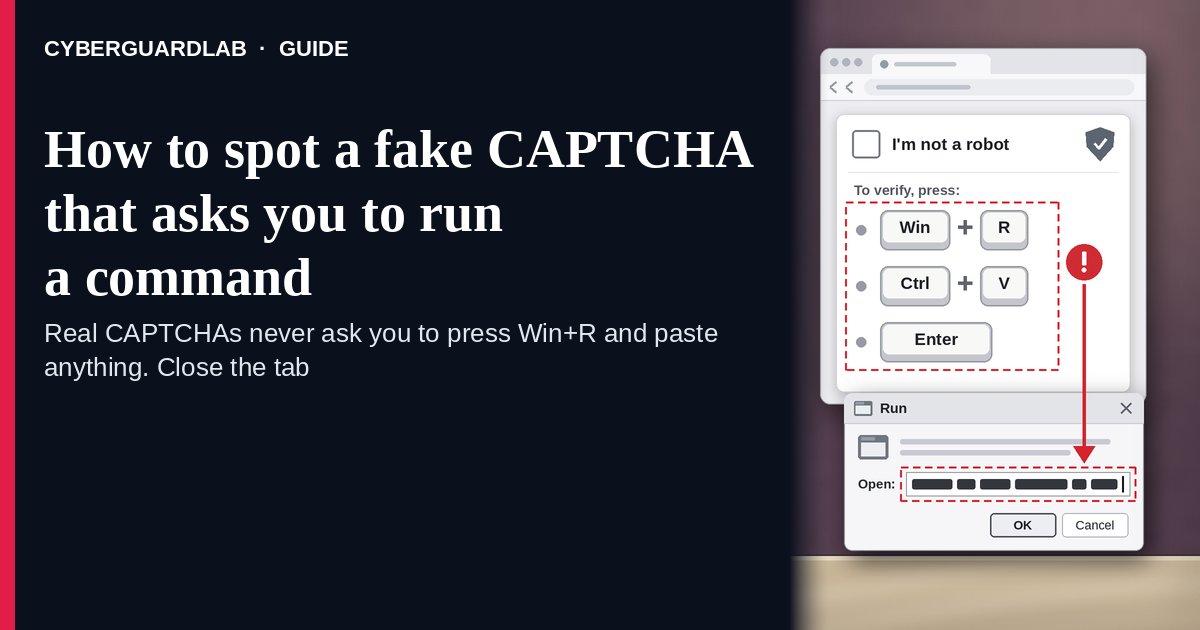
A fake CAPTCHA that asks you to run a command is a “verify you are human” box or fake error message that tells you to press Windows + R, paste what’s on your clipboard, and press Enter — or to do the same in PowerShell, Windows Terminal, or the Mac Terminal. There is no check. When you clicked “Verify,” the page quietly copied a command to your clipboard, and running it installs malware on your own computer. Microsoft calls this technique ClickFix, and the FBI and CISA describe the same Windows + R, Ctrl + V, Enter routine as a way criminals install LummaC2, malware that steals sensitive information. The safe habit is simple: a real CAPTCHA is finished inside the web page, so any instruction to open a box or app outside the browser and paste something means close the tab. This page is about fake verification and “fix this error” prompts that ask you to run a command. Fake virus warnings are in 8 ways to tell a virus warning popup is fake. CyberGuardLab is independent. Referral fees may affect product placement on other pages. Buying nothing and sticking to free habits is a valid outcome.
The short answer
If a CAPTCHA, error message, or “fix” button tells you to press Windows + R, open PowerShell or Terminal, or paste anything and press Enter, stop and close the tab. If you already ran it, disconnect from the internet, change your passwords from another device, and scan.
What a fake CAPTCHA command prompt usually looks like
The page borrows the look of something you click through every day, then asks for one extra step that no real check needs.
Common shapes described by Microsoft, CIS, and the FBI and CISA:
- “Verify you are human” that turns into instructions. You click a box styled like Google reCAPTCHA or Cloudflare Turnstile, and a pop-up lists steps: press Windows + R, press Ctrl + V, press Enter. Microsoft says recent landing pages spoof both.
- A fake error with a “Fix” or “How to fix” button. Microsoft describes lures that mimic a browser crash page or a Word Online “extension missing” message, then tell you to open Windows Terminal or PowerShell and paste the fix.
- A well-known site that suddenly asks for this. CIS says attackers often get into legitimate websites and inject the fake check, so a familiar address is not proof.
- A brand you trust on the page. Microsoft documented ClickFix pages impersonating the US Social Security Administration, the internet provider Spectrum, and Discord. Others arrive by phishing email, bad ads, or a fake document attachment.
- The same trick on a Mac. Microsoft reported a 2025 campaign aimed at Mac users that delivered Atomic macOS Stealer; the copied Mac command kept asking for the system password until it got the right one.
- Variants that skip Windows + R. CIS describes versions that use a File Explorer or Finder window, or ask you to open PowerShell, Command Prompt, or a Mac shell yourself.
We do not say every CAPTCHA is a scam. Puzzles, checkboxes, and “select the images” tests are normal. The test is whether the page asks you to do something outside the browser.
Fake CAPTCHA vs real CAPTCHA vs related lure
| Signal | Fake CAPTCHA (run a command) | Real CAPTCHA (typical) | Related lure (fake crash screen with a phone number) |
|---|---|---|---|
| Where you act | Outside the browser: Run box, PowerShell, Terminal, or File Explorer or Finder window | Inside the web page only | On the phone with a “technician” |
| What it asks | Press Windows + R, Ctrl + V, Enter, or paste a “fix” | Tick a box, solve a puzzle, or pick images | Call a number and allow remote access |
| Your clipboard | Filled with a hidden command when you click “Verify” | Untouched | Untouched |
| Safe next step | Close the tab; don’t paste anything | Finish the check and continue | Close the page; never call the number |
| Related guide | This page | None needed | Fake Windows blue screen support scam |
No website needs you to run a command on your own computer to prove you are human.
How to handle a fake CAPTCHA that asks you to run a command (US household steps)
Do this whenever a verification box, error message, or “fix” button gives you keyboard steps to follow outside the browser. You do not need a paid product to finish these steps.
- Stop at any instruction to leave the browser. Windows + R, “open PowerShell,” “open Terminal,” “paste into a File Explorer or Finder window,” or “press Ctrl + V then Enter” all mean the check is fake.
- Don’t paste anything. Assume your clipboard already holds the attacker’s command, because the page copies it when you click “Verify.” If a Run box or Terminal window is already open, close it without pressing Enter, then copy a harmless word so the command is no longer on your clipboard.
- Close the tab and get to the site another way. Type the address yourself or use a bookmark. If the same check shows up again, leave the site; it may have been hacked.
- If you pressed Enter, disconnect now. Turn off Wi-Fi or unplug the network cable so the command can’t keep downloading or sending data. If you’re not sure whether it ran, assume it did.
- Change passwords from a different device you trust. Start with email, banking, and your password manager, then accounts saved in that computer’s browser. Turn on two-step verification and sign out of other sessions. The FTC says to stop logging in to online accounts on a computer you think has malware. More first-hour steps are in Clicked a phishing link — first hour.
- Scan, then report. Run a full scan with Windows Security, then a Microsoft Defender Offline scan. Report the page at ReportFraud.ftc.gov, and file at IC3.gov if money or accounts were stolen. Checklist: How to report a scam to the FTC.
Signs the check is fake (scan table)
Use this as a quick pass before you follow any “verify” or “fix” steps.
| Sign | Why it matters | What to do |
|---|---|---|
| Steps mention Windows + R, Run, PowerShell, or Terminal | A real CAPTCHA never leaves the page | Close the tab |
| “Press Ctrl + V” when you didn’t copy anything | The page put a command on your clipboard | Don’t paste; copy a harmless word |
| A “Fix” or “How to fix” button on an error message | Fake errors are a common ClickFix lure | Close it; update software from Settings instead |
| The check appears on a site you know | Attackers inject fake checks into hacked sites | Leave and try again later, or skip the site |
| A Mac window asks for your password after you pasted something | Documented Mac versions ask for your password to steal it | Don’t type it; disconnect and get help |
| Windows Security or your antivirus blocks or warns about the page or command | Microsoft says Defender can catch ClickFix PowerShell through AMSI | Trust the warning; close the page and don’t retry |
Free habits that reduce the blast radius
You do not need a new subscription to lower damage if a fake check gets through.
- Household rule: nobody pastes anything into Run, PowerShell, Command Prompt, or Terminal because a website, pop-up, or email said so.
- Keep Windows Security or Mac protections on and updated; Microsoft says Defender’s Antimalware Scan Interface can scan PowerShell scripts.
- Use a standard (non-admin) account for everyday browsing so a bad command has less reach. See Use a standard user account day to day.
- Keep passwords in a password manager instead of the browser on shared family PCs, and turn on two-step verification for email and banking.
- Get software and fixes only from Settings, the Microsoft Store, the Mac App Store, or the maker’s own site you typed.
- Optional antivirus or web filtering is a separate layer that may block the download a command tries to fetch; it does not replace the don’t-paste rule. Built-in Microsoft Defender plus that rule is enough for many households.
What this page is not
This page is not a review of CAPTCHA services, not a guide for websites that run CAPTCHAs, and not an IT admin or business hardening guide.
It does not claim CyberGuardLab lab scores, infection counts, or “#1 protection” ranks. It does not say Google, Cloudflare, or any brand shown on these pages was hacked — attackers copy their look. It is not the fake virus warning guide (see 8 ways to tell a virus warning popup is fake), not the fake blue screen and support-number guide (see Fake Windows blue screen support scam), not the notification spam guide (see Browser push notification scam), and not the guide to checking a file you downloaded on purpose (see Check a download before opening it). The difference: here nothing is downloaded or called by you directly — you are asked to type the attacker’s command yourself. Official reporting stays with ReportFraud.ftc.gov, IC3.gov, and IdentityTheft.gov if personal data was stolen.
If you decide a paid extra is a real job
Most households can handle fake CAPTCHAs with the free steps above. Open a paid page only if you already named a job — for example web filtering that blocks known malicious sites, a second opinion scan after a command ran, or identity alerts after passwords were stolen — and you will actually use it.
- PC / Mac suite with web and malware protections many households already compare: Norton plans (paid link; confirm renewal price).
- Independent-test–oriented suite option: Bitdefender plans (paid link).
- Household suite shopping starting point: TotalAV plans (paid link; confirm renewal).
- Multi-device bill under one vendor: McAfee plans (paid link; confirm device limit).
- Another suite path some homes already use: Avast plans (paid link).
Buying nothing beyond the free don’t-paste habit is still valid. Paid links above are on-site only.
FAQ
Do real CAPTCHAs ever ask you to press Windows + R?
No. A real CAPTCHA is completed inside the web page with a checkbox, puzzle, or image test. Instructions to press Windows + R, open PowerShell or Terminal, or paste and press Enter are the scam Microsoft calls ClickFix.
I pasted the command but didn’t press Enter. Am I safe?
If you only pasted into the Run box and closed it without pressing Enter or OK, the command most likely didn’t run. Close the box, copy a harmless word to replace the clipboard, and close the tab. If you pasted into PowerShell or Terminal, or you’re not sure, treat it as if it ran.
Why did a website I trust show this?
CIS says attackers often break into legitimate websites and inject the fake check, and Microsoft says the pages also arrive through phishing emails and bad ads. Leave the site and report it; the site owner may not know.
Does this scam work on a Mac?
Yes. Microsoft reported a campaign aimed at Mac users that delivered Atomic macOS Stealer and kept asking for the system password. Never paste a website’s command into Terminal. More on built-in Mac protections: Protect a Mac from malware.
I ran the command. Do I need to wipe my computer?
Not always first. Disconnect, change passwords from another device, then run a full scan and a Microsoft Defender Offline scan. If the scans find threats you can’t remove, or the computer keeps acting strangely, back up your personal files and reset it — see Reset Windows 11 and keep files — or get help from the device maker.
Do I need paid antivirus to stop fake CAPTCHAs?
No. The protection is a habit: never paste a website’s command into Run, PowerShell, or Terminal. Microsoft Defender plus that habit is enough for many households. Antivirus can be an optional layer that may block what the command downloads; it does not replace the habit.